> ## Documentation Index
> Fetch the complete documentation index at: https://docs-dev-feat-session-delegation.mintlify.site/llms.txt
> Use this file to discover all available pages before exploring further.

> Learn how to configure an update policy form using Forms for Actions for users to review and accept new terms of service or consent updates.

# Use Cases: Configure an update policy form using Forms

<Card title="Before you start">
  1. Create a [Machine-to-Machine Application](/docs/get-started/auth0-overview/create-applications/machine-to-machine-apps) with the following scopes enabled:

  * `read:users`
  * `update:users`
  * `create:users`
  * `read:users_app_metadata`
  * `update:users_app_metadata`
  * `create:users_app_metadata`

  2. Add a [Vault connection](/docs/customize/forms/vault) using the M2M application credentials.
</Card>

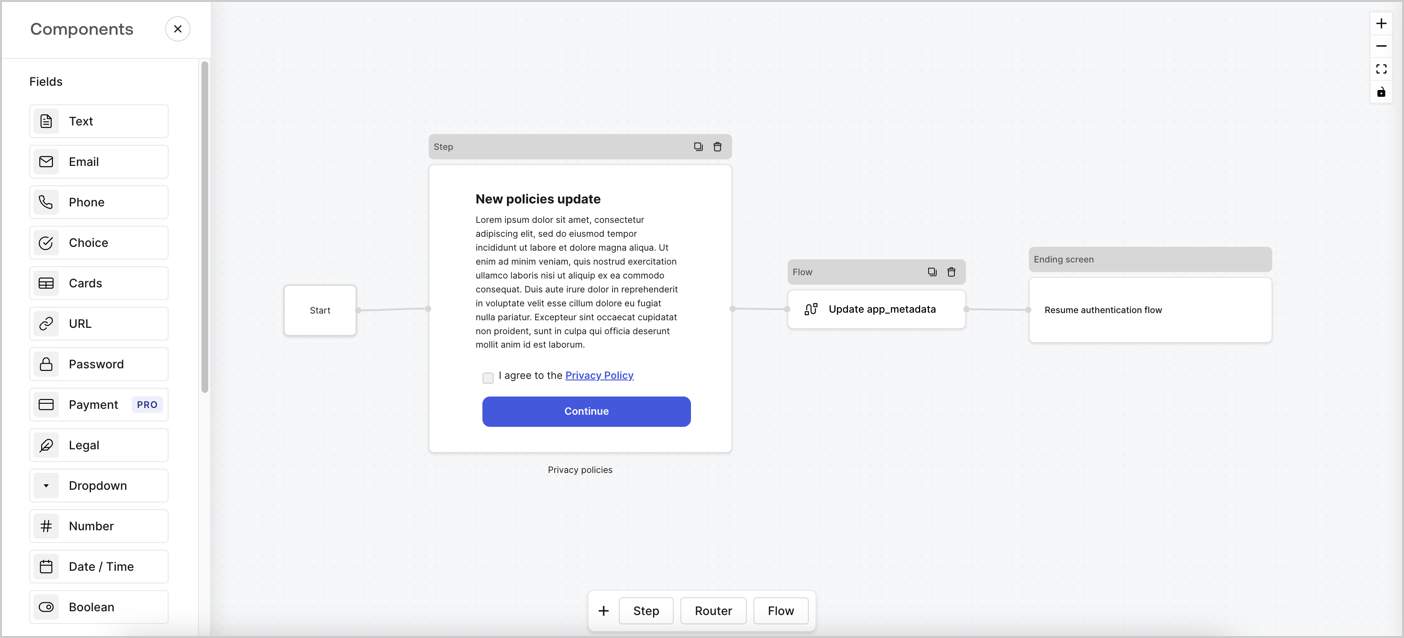
Forms for Actions allows you to create custom privacy policies flows and store the consent under the `app_metadata` object.
<Frame>
  <img src="https://mintcdn.com/docs-dev-feat-session-delegation/qhOWBsOBXmoPzRt8/docs/images/cdy7uua7fh8z/6i68dMvHDTijfRmSgN1x8Q/ad900e7d4c0fb34645921435472b8684/privavy-policy-form.png?fit=max&auto=format&n=qhOWBsOBXmoPzRt8&q=85&s=29e4986f08b945998f620ba175f8e70e" alt="Dashboard > Actions > Forms > Privacy policy use case" data-og-width="1404" width="1404" data-og-height="638" height="638" data-path="docs/images/cdy7uua7fh8z/6i68dMvHDTijfRmSgN1x8Q/ad900e7d4c0fb34645921435472b8684/privavy-policy-form.png" data-optimize="true" data-opv="3" srcset="https://mintcdn.com/docs-dev-feat-session-delegation/qhOWBsOBXmoPzRt8/docs/images/cdy7uua7fh8z/6i68dMvHDTijfRmSgN1x8Q/ad900e7d4c0fb34645921435472b8684/privavy-policy-form.png?w=280&fit=max&auto=format&n=qhOWBsOBXmoPzRt8&q=85&s=5827ec99dff2fa3807721fdc9dd49485 280w, https://mintcdn.com/docs-dev-feat-session-delegation/qhOWBsOBXmoPzRt8/docs/images/cdy7uua7fh8z/6i68dMvHDTijfRmSgN1x8Q/ad900e7d4c0fb34645921435472b8684/privavy-policy-form.png?w=560&fit=max&auto=format&n=qhOWBsOBXmoPzRt8&q=85&s=34e4fc4cab17202f4ab7f825000177b4 560w, https://mintcdn.com/docs-dev-feat-session-delegation/qhOWBsOBXmoPzRt8/docs/images/cdy7uua7fh8z/6i68dMvHDTijfRmSgN1x8Q/ad900e7d4c0fb34645921435472b8684/privavy-policy-form.png?w=840&fit=max&auto=format&n=qhOWBsOBXmoPzRt8&q=85&s=d41555d67a8861e8b531cd07d3b726e2 840w, https://mintcdn.com/docs-dev-feat-session-delegation/qhOWBsOBXmoPzRt8/docs/images/cdy7uua7fh8z/6i68dMvHDTijfRmSgN1x8Q/ad900e7d4c0fb34645921435472b8684/privavy-policy-form.png?w=1100&fit=max&auto=format&n=qhOWBsOBXmoPzRt8&q=85&s=956543b8f7ebe1332d9fb259cdb67df2 1100w, https://mintcdn.com/docs-dev-feat-session-delegation/qhOWBsOBXmoPzRt8/docs/images/cdy7uua7fh8z/6i68dMvHDTijfRmSgN1x8Q/ad900e7d4c0fb34645921435472b8684/privavy-policy-form.png?w=1650&fit=max&auto=format&n=qhOWBsOBXmoPzRt8&q=85&s=f1a4f6e5b5c73a49eb4c97dc43ade1bf 1650w, https://mintcdn.com/docs-dev-feat-session-delegation/qhOWBsOBXmoPzRt8/docs/images/cdy7uua7fh8z/6i68dMvHDTijfRmSgN1x8Q/ad900e7d4c0fb34645921435472b8684/privavy-policy-form.png?w=2500&fit=max&auto=format&n=qhOWBsOBXmoPzRt8&q=85&s=ffcd4605376516691d21b4486048a153 2500w" />
</Frame>

The sections below outline how you can create an Update Policy form using nodes and flows, along with steps for adding your form to a [Post Login](/docs/customize/actions/explore-triggers/signup-and-login-triggers/login-trigger) Action.

## Create a form from scratch

Follow these steps to create a form to gather information:

1. Open the Form editor by selecting **Auth0 Dashboard > Actions > Forms.**
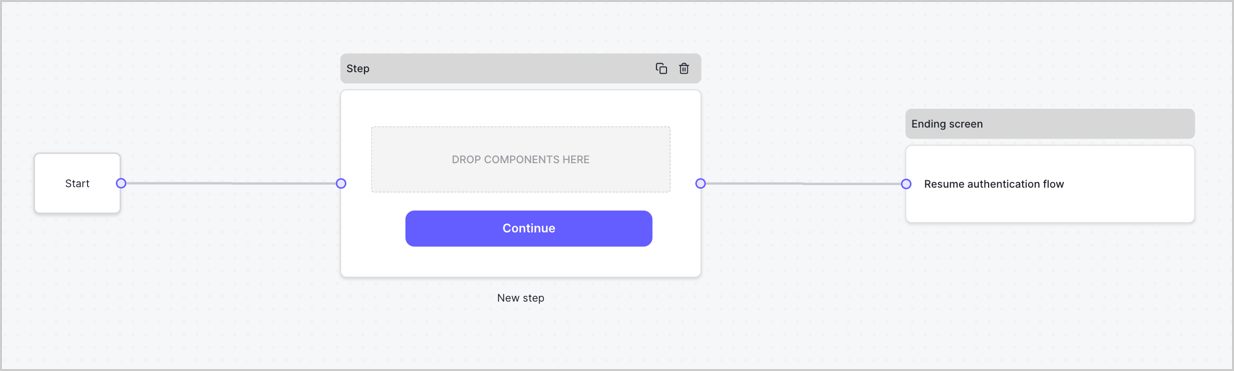
2. Select **Create Form** > **Start from scratch**.

By default, a new form contains a Start node, a Step node, and an Ending screen node.
<Frame>
  <img src="https://mintcdn.com/docs-dev-feat-session-delegation/LI-GoqbUgvY1SMG-/docs/images/cdy7uua7fh8z/2TZ9jSjgEcARFpULI6hz4R/a4319a1bd482f2ee5cc23100fdb2f42c/New-form-Forms-for-action-use-case.png?fit=max&auto=format&n=LI-GoqbUgvY1SMG-&q=85&s=b781e3b3c0c087b381d5927a35b46a21" alt="Dashboard > Forms > Use Cases > Form" data-og-width="1234" width="1234" data-og-height="371" height="371" data-path="docs/images/cdy7uua7fh8z/2TZ9jSjgEcARFpULI6hz4R/a4319a1bd482f2ee5cc23100fdb2f42c/New-form-Forms-for-action-use-case.png" data-optimize="true" data-opv="3" srcset="https://mintcdn.com/docs-dev-feat-session-delegation/LI-GoqbUgvY1SMG-/docs/images/cdy7uua7fh8z/2TZ9jSjgEcARFpULI6hz4R/a4319a1bd482f2ee5cc23100fdb2f42c/New-form-Forms-for-action-use-case.png?w=280&fit=max&auto=format&n=LI-GoqbUgvY1SMG-&q=85&s=5fb952f7889f636d86c47f9f5d97499c 280w, https://mintcdn.com/docs-dev-feat-session-delegation/LI-GoqbUgvY1SMG-/docs/images/cdy7uua7fh8z/2TZ9jSjgEcARFpULI6hz4R/a4319a1bd482f2ee5cc23100fdb2f42c/New-form-Forms-for-action-use-case.png?w=560&fit=max&auto=format&n=LI-GoqbUgvY1SMG-&q=85&s=edb43af083d26195896538d97fa1dcad 560w, https://mintcdn.com/docs-dev-feat-session-delegation/LI-GoqbUgvY1SMG-/docs/images/cdy7uua7fh8z/2TZ9jSjgEcARFpULI6hz4R/a4319a1bd482f2ee5cc23100fdb2f42c/New-form-Forms-for-action-use-case.png?w=840&fit=max&auto=format&n=LI-GoqbUgvY1SMG-&q=85&s=53d56441e703258d301d07ca3128be83 840w, https://mintcdn.com/docs-dev-feat-session-delegation/LI-GoqbUgvY1SMG-/docs/images/cdy7uua7fh8z/2TZ9jSjgEcARFpULI6hz4R/a4319a1bd482f2ee5cc23100fdb2f42c/New-form-Forms-for-action-use-case.png?w=1100&fit=max&auto=format&n=LI-GoqbUgvY1SMG-&q=85&s=86f44fbe7b767ce7cce27e55bf5d83fb 1100w, https://mintcdn.com/docs-dev-feat-session-delegation/LI-GoqbUgvY1SMG-/docs/images/cdy7uua7fh8z/2TZ9jSjgEcARFpULI6hz4R/a4319a1bd482f2ee5cc23100fdb2f42c/New-form-Forms-for-action-use-case.png?w=1650&fit=max&auto=format&n=LI-GoqbUgvY1SMG-&q=85&s=fd96e8902b28e6265b8e611795f5320e 1650w, https://mintcdn.com/docs-dev-feat-session-delegation/LI-GoqbUgvY1SMG-/docs/images/cdy7uua7fh8z/2TZ9jSjgEcARFpULI6hz4R/a4319a1bd482f2ee5cc23100fdb2f42c/New-form-Forms-for-action-use-case.png?w=2500&fit=max&auto=format&n=LI-GoqbUgvY1SMG-&q=85&s=881f2706e32a52e67bfbf8187621d76e 2500w" />
</Frame>

### Configure the Step node

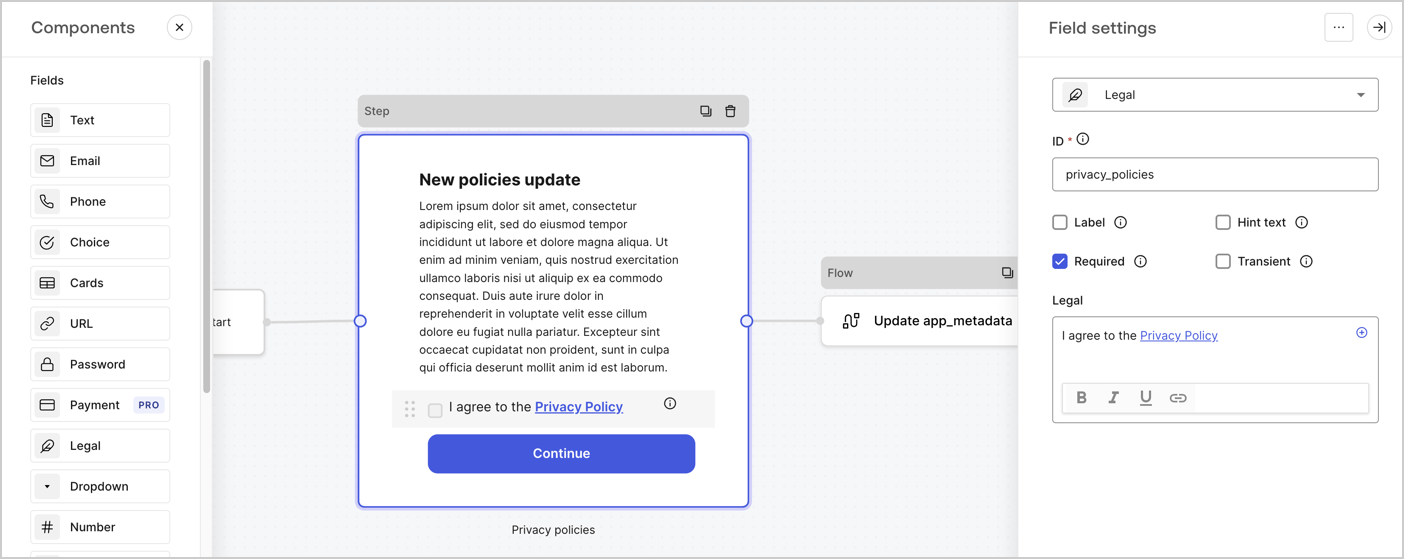
The Step node is the graphical interface visible to users. Add [Fields](/docs/customize/forms/nodes-and-components) to the Step node to collect the new agreement acceptance value by following these steps:

1. Drag a **Rich text** field from the **Components menu** into the **Step** node.

   * **Rich text**: Enter a description of your privacy policies updates.
   * Select **Save**.
2. Drag a **Legal** field into the **Step** node.

   * **ID**: Enter `privacy_policies`.
   * **Required**: Enable the checkbox.
   * **Legal**: Enter `I agree to the Privacy Policy`.
   * Select **Save**.
3. Select **Publish** to save.
<Frame>
  <img src="https://mintcdn.com/docs-dev-feat-session-delegation/P905NY4QV9vkB_LM/docs/images/cdy7uua7fh8z/59zFFjQjAnjogkc2QGIqqJ/0ad66b1b636544122aa4e65968b76c2c/privacy-policy-step-node.png?fit=max&auto=format&n=P905NY4QV9vkB_LM&q=85&s=088dc9a1e820d471fcde0bad39f20324" alt="Dashboard > Actions > Forms > Use case privacy policy step node" data-og-width="1404" width="1404" data-og-height="559" height="559" data-path="docs/images/cdy7uua7fh8z/59zFFjQjAnjogkc2QGIqqJ/0ad66b1b636544122aa4e65968b76c2c/privacy-policy-step-node.png" data-optimize="true" data-opv="3" srcset="https://mintcdn.com/docs-dev-feat-session-delegation/P905NY4QV9vkB_LM/docs/images/cdy7uua7fh8z/59zFFjQjAnjogkc2QGIqqJ/0ad66b1b636544122aa4e65968b76c2c/privacy-policy-step-node.png?w=280&fit=max&auto=format&n=P905NY4QV9vkB_LM&q=85&s=790986b067ca26d09b7705b412101e63 280w, https://mintcdn.com/docs-dev-feat-session-delegation/P905NY4QV9vkB_LM/docs/images/cdy7uua7fh8z/59zFFjQjAnjogkc2QGIqqJ/0ad66b1b636544122aa4e65968b76c2c/privacy-policy-step-node.png?w=560&fit=max&auto=format&n=P905NY4QV9vkB_LM&q=85&s=a7be18ed8ebdd305f3f3d2e2b36c729b 560w, https://mintcdn.com/docs-dev-feat-session-delegation/P905NY4QV9vkB_LM/docs/images/cdy7uua7fh8z/59zFFjQjAnjogkc2QGIqqJ/0ad66b1b636544122aa4e65968b76c2c/privacy-policy-step-node.png?w=840&fit=max&auto=format&n=P905NY4QV9vkB_LM&q=85&s=06f999d36fd8b4d00525f172e65c1c53 840w, https://mintcdn.com/docs-dev-feat-session-delegation/P905NY4QV9vkB_LM/docs/images/cdy7uua7fh8z/59zFFjQjAnjogkc2QGIqqJ/0ad66b1b636544122aa4e65968b76c2c/privacy-policy-step-node.png?w=1100&fit=max&auto=format&n=P905NY4QV9vkB_LM&q=85&s=1e2298dda20bed9873e29d0d10effe48 1100w, https://mintcdn.com/docs-dev-feat-session-delegation/P905NY4QV9vkB_LM/docs/images/cdy7uua7fh8z/59zFFjQjAnjogkc2QGIqqJ/0ad66b1b636544122aa4e65968b76c2c/privacy-policy-step-node.png?w=1650&fit=max&auto=format&n=P905NY4QV9vkB_LM&q=85&s=4b7e507ceee19deaaf2c62aa5444f757 1650w, https://mintcdn.com/docs-dev-feat-session-delegation/P905NY4QV9vkB_LM/docs/images/cdy7uua7fh8z/59zFFjQjAnjogkc2QGIqqJ/0ad66b1b636544122aa4e65968b76c2c/privacy-policy-step-node.png?w=2500&fit=max&auto=format&n=P905NY4QV9vkB_LM&q=85&s=56cb5dcd485d90c9c49411cc73aef465 2500w" />
</Frame>

### Configure the Flow node

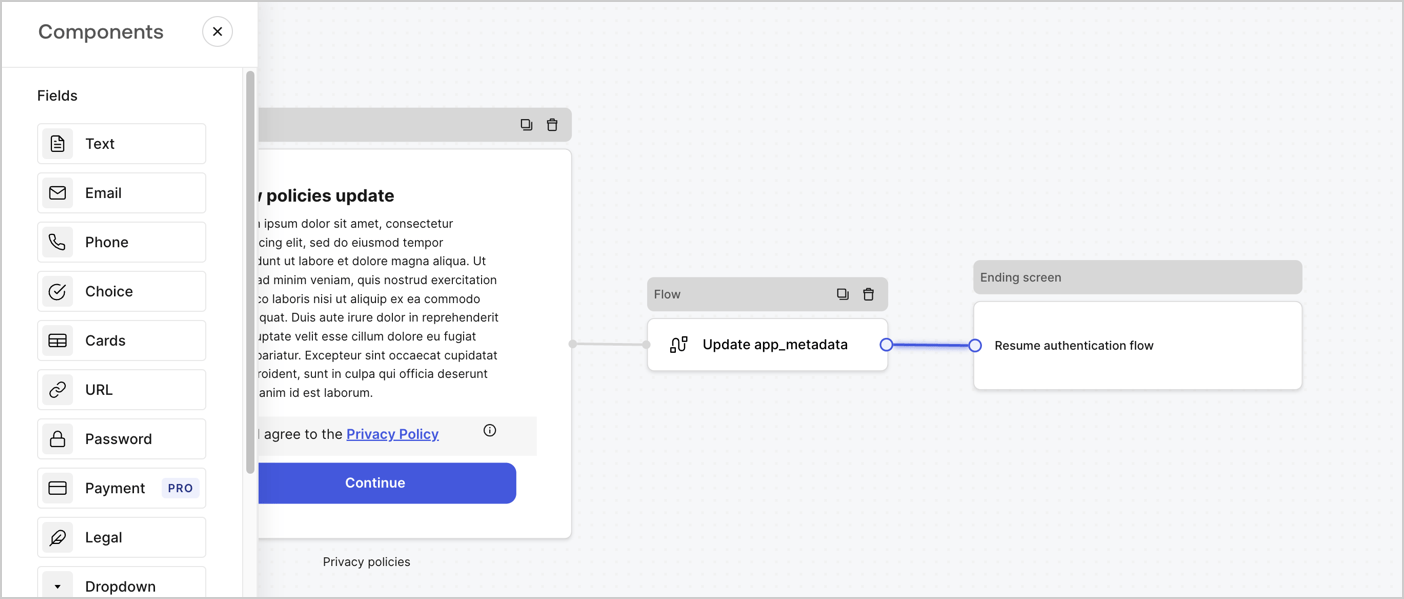
Add a **Flow** node after the **Step** node to update the `app_metadata` and resume the authentication flow by following these steps:

1. Select **Flow** from the bottom of the Form editor.
2. Remove the existing link between the **Step** and **Ending Screen** nodes.
3. Select the new **Flow** > **Click to add a flow** > **Create a new flow.**

   * Enter `Update app_metadata` in the **Name** field.
   * Select **Create**.
   * Select **Save**.
4. Link the **Flow** node to the **Step** and **Ending Screen** nodes as pictured below.
5. Select **Publish** to save.
<Frame>
  <img src="https://mintcdn.com/docs-dev-feat-session-delegation/qhOWBsOBXmoPzRt8/docs/images/cdy7uua7fh8z/6YIkzm7SrpM9LW76AXuRzh/353c518fe82bbaa440836da1d83596d6/link-policies.png?fit=max&auto=format&n=qhOWBsOBXmoPzRt8&q=85&s=eb54996892b1a3b407e16011231b428e" alt="Dashboard > Actions > Forms > Form" data-og-width="1404" width="1404" data-og-height="599" height="599" data-path="docs/images/cdy7uua7fh8z/6YIkzm7SrpM9LW76AXuRzh/353c518fe82bbaa440836da1d83596d6/link-policies.png" data-optimize="true" data-opv="3" srcset="https://mintcdn.com/docs-dev-feat-session-delegation/qhOWBsOBXmoPzRt8/docs/images/cdy7uua7fh8z/6YIkzm7SrpM9LW76AXuRzh/353c518fe82bbaa440836da1d83596d6/link-policies.png?w=280&fit=max&auto=format&n=qhOWBsOBXmoPzRt8&q=85&s=d1a2e0b530cded830766b3d8810b81a7 280w, https://mintcdn.com/docs-dev-feat-session-delegation/qhOWBsOBXmoPzRt8/docs/images/cdy7uua7fh8z/6YIkzm7SrpM9LW76AXuRzh/353c518fe82bbaa440836da1d83596d6/link-policies.png?w=560&fit=max&auto=format&n=qhOWBsOBXmoPzRt8&q=85&s=7de1d3d13ee3a6f693c37f1261286527 560w, https://mintcdn.com/docs-dev-feat-session-delegation/qhOWBsOBXmoPzRt8/docs/images/cdy7uua7fh8z/6YIkzm7SrpM9LW76AXuRzh/353c518fe82bbaa440836da1d83596d6/link-policies.png?w=840&fit=max&auto=format&n=qhOWBsOBXmoPzRt8&q=85&s=aa9233d401a937f64f049326827b5739 840w, https://mintcdn.com/docs-dev-feat-session-delegation/qhOWBsOBXmoPzRt8/docs/images/cdy7uua7fh8z/6YIkzm7SrpM9LW76AXuRzh/353c518fe82bbaa440836da1d83596d6/link-policies.png?w=1100&fit=max&auto=format&n=qhOWBsOBXmoPzRt8&q=85&s=bcb1fd1901dbd96dd804907b8128c620 1100w, https://mintcdn.com/docs-dev-feat-session-delegation/qhOWBsOBXmoPzRt8/docs/images/cdy7uua7fh8z/6YIkzm7SrpM9LW76AXuRzh/353c518fe82bbaa440836da1d83596d6/link-policies.png?w=1650&fit=max&auto=format&n=qhOWBsOBXmoPzRt8&q=85&s=8c4c79382d82c9e5f5e7329740c0e768 1650w, https://mintcdn.com/docs-dev-feat-session-delegation/qhOWBsOBXmoPzRt8/docs/images/cdy7uua7fh8z/6YIkzm7SrpM9LW76AXuRzh/353c518fe82bbaa440836da1d83596d6/link-policies.png?w=2500&fit=max&auto=format&n=qhOWBsOBXmoPzRt8&q=85&s=d23d355e6422f3bd78421c78362a4132 2500w" />
</Frame>

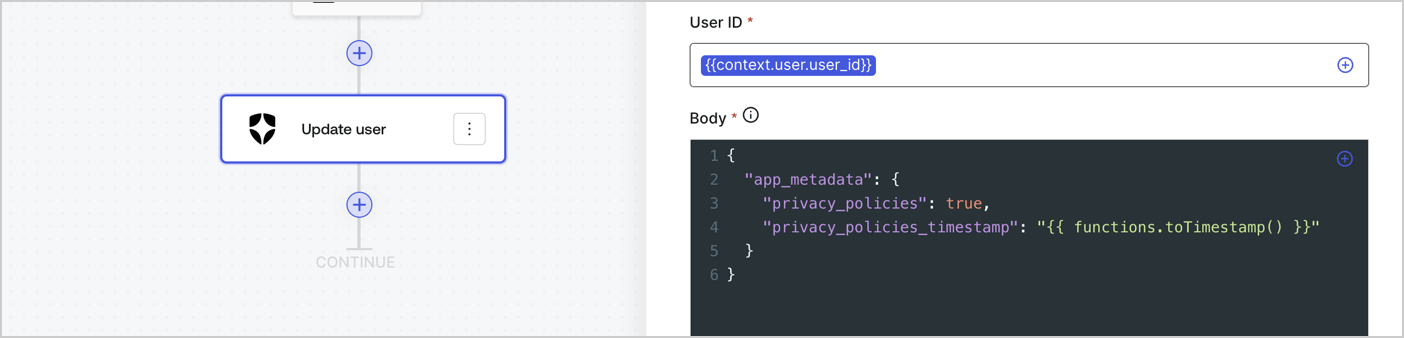
Add an Auth0 Update user action to the flow by following these steps:

1. Select the **Flow** **Update app\_metadata** > **Edit flow** to open the Flow editor in a new tab.
2. Below the StartAction, select the **+** icon to add an **Update user** action. Complete the fields below, then select **Save** to continue.

   * **Connection**: Select from the dropdown the Vault connection to your M2M application.

   * **User ID**: Enter `{{context.user.user_id}}`.

   * **Body**: Copy and paste the following code to update the app\_metadata with the privacy\_policies and privacy\_policies\_timestamp properties.

     ```text lines theme={null}
     {
       "app_metadata": {
         "privacy_policies": true,
         "privacy_policies_timestamp": "{{ functions.toTimestamp() }}"
       }
     }
     ```

   * Select **Save**.
3. Select **Publish** to save.
<Frame>
  <img src="https://mintcdn.com/docs-dev-feat-session-delegation/Ik43N1p3JNhaPxi7/docs/images/cdy7uua7fh8z/CvMNIwWrOUwaFW4X3G28p/1fb70ae57a20749d9ffaaba8dc0b7e26/update-user-privacy.png?fit=max&auto=format&n=Ik43N1p3JNhaPxi7&q=85&s=63c6aeba50feaefe8d22a920cb82ce91" alt="Dashboard > Actions > Forms > User case privacy policy code" data-og-width="1404" width="1404" data-og-height="338" height="338" data-path="docs/images/cdy7uua7fh8z/CvMNIwWrOUwaFW4X3G28p/1fb70ae57a20749d9ffaaba8dc0b7e26/update-user-privacy.png" data-optimize="true" data-opv="3" srcset="https://mintcdn.com/docs-dev-feat-session-delegation/Ik43N1p3JNhaPxi7/docs/images/cdy7uua7fh8z/CvMNIwWrOUwaFW4X3G28p/1fb70ae57a20749d9ffaaba8dc0b7e26/update-user-privacy.png?w=280&fit=max&auto=format&n=Ik43N1p3JNhaPxi7&q=85&s=f04ff04b74c14d8088ca61960bd82a7c 280w, https://mintcdn.com/docs-dev-feat-session-delegation/Ik43N1p3JNhaPxi7/docs/images/cdy7uua7fh8z/CvMNIwWrOUwaFW4X3G28p/1fb70ae57a20749d9ffaaba8dc0b7e26/update-user-privacy.png?w=560&fit=max&auto=format&n=Ik43N1p3JNhaPxi7&q=85&s=4d6d7095995bc4defc846c0aba6b74d1 560w, https://mintcdn.com/docs-dev-feat-session-delegation/Ik43N1p3JNhaPxi7/docs/images/cdy7uua7fh8z/CvMNIwWrOUwaFW4X3G28p/1fb70ae57a20749d9ffaaba8dc0b7e26/update-user-privacy.png?w=840&fit=max&auto=format&n=Ik43N1p3JNhaPxi7&q=85&s=33b66205ac4a24e8261a80170ce56176 840w, https://mintcdn.com/docs-dev-feat-session-delegation/Ik43N1p3JNhaPxi7/docs/images/cdy7uua7fh8z/CvMNIwWrOUwaFW4X3G28p/1fb70ae57a20749d9ffaaba8dc0b7e26/update-user-privacy.png?w=1100&fit=max&auto=format&n=Ik43N1p3JNhaPxi7&q=85&s=ee3b2270ab25f305d526f1d970f37a0b 1100w, https://mintcdn.com/docs-dev-feat-session-delegation/Ik43N1p3JNhaPxi7/docs/images/cdy7uua7fh8z/CvMNIwWrOUwaFW4X3G28p/1fb70ae57a20749d9ffaaba8dc0b7e26/update-user-privacy.png?w=1650&fit=max&auto=format&n=Ik43N1p3JNhaPxi7&q=85&s=1e98361f4c42a8b0aa48a169df68d89a 1650w, https://mintcdn.com/docs-dev-feat-session-delegation/Ik43N1p3JNhaPxi7/docs/images/cdy7uua7fh8z/CvMNIwWrOUwaFW4X3G28p/1fb70ae57a20749d9ffaaba8dc0b7e26/update-user-privacy.png?w=2500&fit=max&auto=format&n=Ik43N1p3JNhaPxi7&q=85&s=835b0a3fa073c56c6df30a6d9614910e 2500w" />
</Frame>

<Callout icon="file-lines" color="#0EA5E9" iconType="regular">
  The flow **Update app\_metadata** adds a `privacy_policies true` value to the app`_metadata` object and also generates a timestamp with a [helper function.](/docs/customize/forms/variables)
</Callout>

## Retrieve the form render code

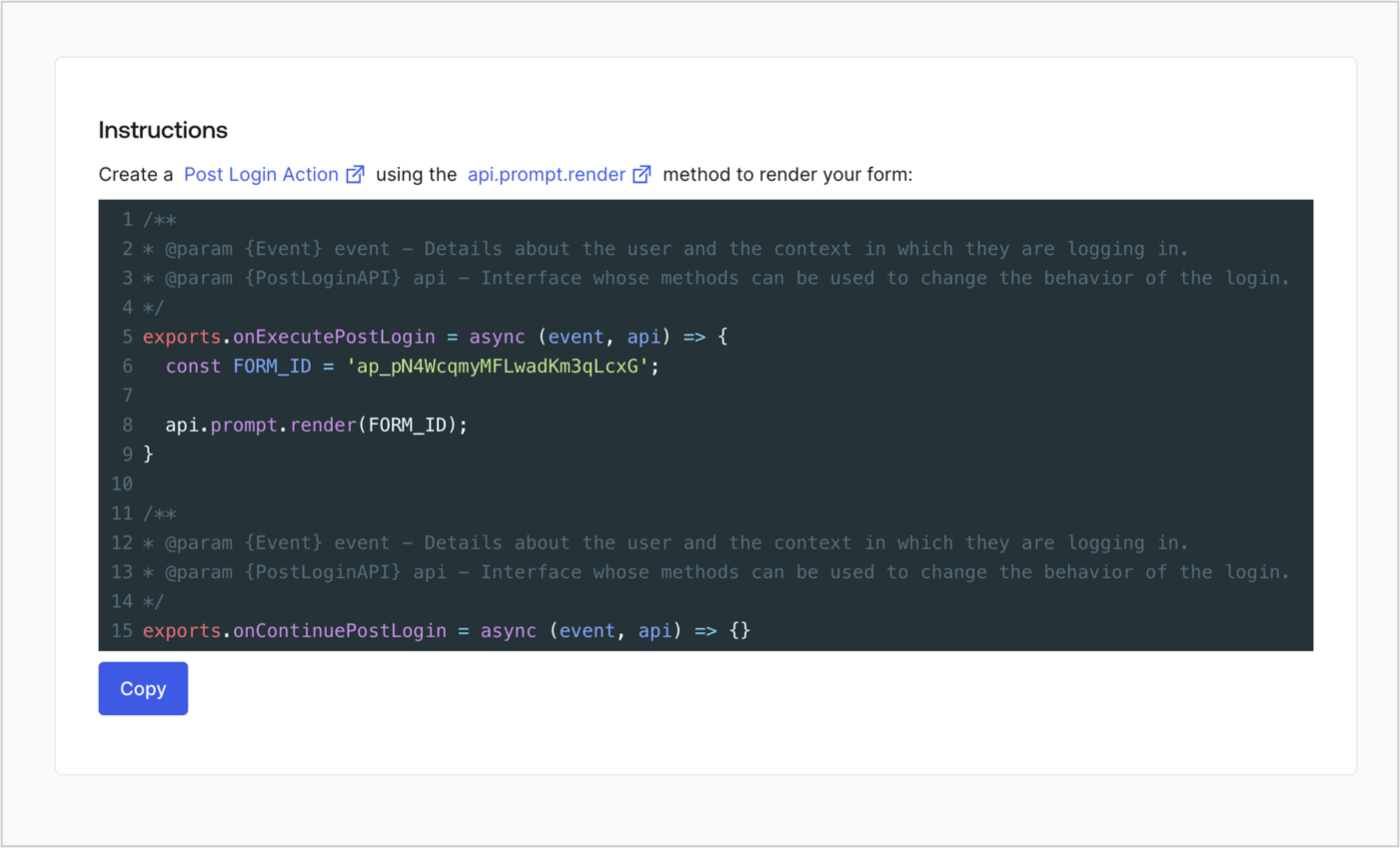
Retrieve your form render code to visually render the form with a custom Post Login Action by following these steps:

* From the Form editor, select **`<> Render`**.
* Select **Copy**.
<Frame>
  <img src="https://mintcdn.com/docs-dev-feat-session-delegation/85JKPd2qgKH9IUtm/docs/images/cdy7uua7fh8z/2EIUzc539sq9lwoTKbjoJv/496a864c0fc44a782c9cadca119dbfb0/embed.png?fit=max&auto=format&n=85JKPd2qgKH9IUtm&q=85&s=5528efdc2c6aac08b17822780e5c031c" alt="Dashboard > Actions > Forms > Form > Embed" data-og-width="1400" width="1400" data-og-height="848" height="848" data-path="docs/images/cdy7uua7fh8z/2EIUzc539sq9lwoTKbjoJv/496a864c0fc44a782c9cadca119dbfb0/embed.png" data-optimize="true" data-opv="3" srcset="https://mintcdn.com/docs-dev-feat-session-delegation/85JKPd2qgKH9IUtm/docs/images/cdy7uua7fh8z/2EIUzc539sq9lwoTKbjoJv/496a864c0fc44a782c9cadca119dbfb0/embed.png?w=280&fit=max&auto=format&n=85JKPd2qgKH9IUtm&q=85&s=a7ee1a0720d068a92240be42ab4a38d3 280w, https://mintcdn.com/docs-dev-feat-session-delegation/85JKPd2qgKH9IUtm/docs/images/cdy7uua7fh8z/2EIUzc539sq9lwoTKbjoJv/496a864c0fc44a782c9cadca119dbfb0/embed.png?w=560&fit=max&auto=format&n=85JKPd2qgKH9IUtm&q=85&s=3df0aa2a7423900e199a5e76f63fad66 560w, https://mintcdn.com/docs-dev-feat-session-delegation/85JKPd2qgKH9IUtm/docs/images/cdy7uua7fh8z/2EIUzc539sq9lwoTKbjoJv/496a864c0fc44a782c9cadca119dbfb0/embed.png?w=840&fit=max&auto=format&n=85JKPd2qgKH9IUtm&q=85&s=a01e27c9ae2a480f172e255e797e9dae 840w, https://mintcdn.com/docs-dev-feat-session-delegation/85JKPd2qgKH9IUtm/docs/images/cdy7uua7fh8z/2EIUzc539sq9lwoTKbjoJv/496a864c0fc44a782c9cadca119dbfb0/embed.png?w=1100&fit=max&auto=format&n=85JKPd2qgKH9IUtm&q=85&s=20ceb82da7c918c814d7380f7abe0715 1100w, https://mintcdn.com/docs-dev-feat-session-delegation/85JKPd2qgKH9IUtm/docs/images/cdy7uua7fh8z/2EIUzc539sq9lwoTKbjoJv/496a864c0fc44a782c9cadca119dbfb0/embed.png?w=1650&fit=max&auto=format&n=85JKPd2qgKH9IUtm&q=85&s=d54cf74effcf8e988d7d18bfa35856fd 1650w, https://mintcdn.com/docs-dev-feat-session-delegation/85JKPd2qgKH9IUtm/docs/images/cdy7uua7fh8z/2EIUzc539sq9lwoTKbjoJv/496a864c0fc44a782c9cadca119dbfb0/embed.png?w=2500&fit=max&auto=format&n=85JKPd2qgKH9IUtm&q=85&s=5d87bb23a2a3ed5cbc2ffa5b440b89a6 2500w" />
</Frame>

## Create a Post Login Action

Create a post-login Action to render your form by following these steps:

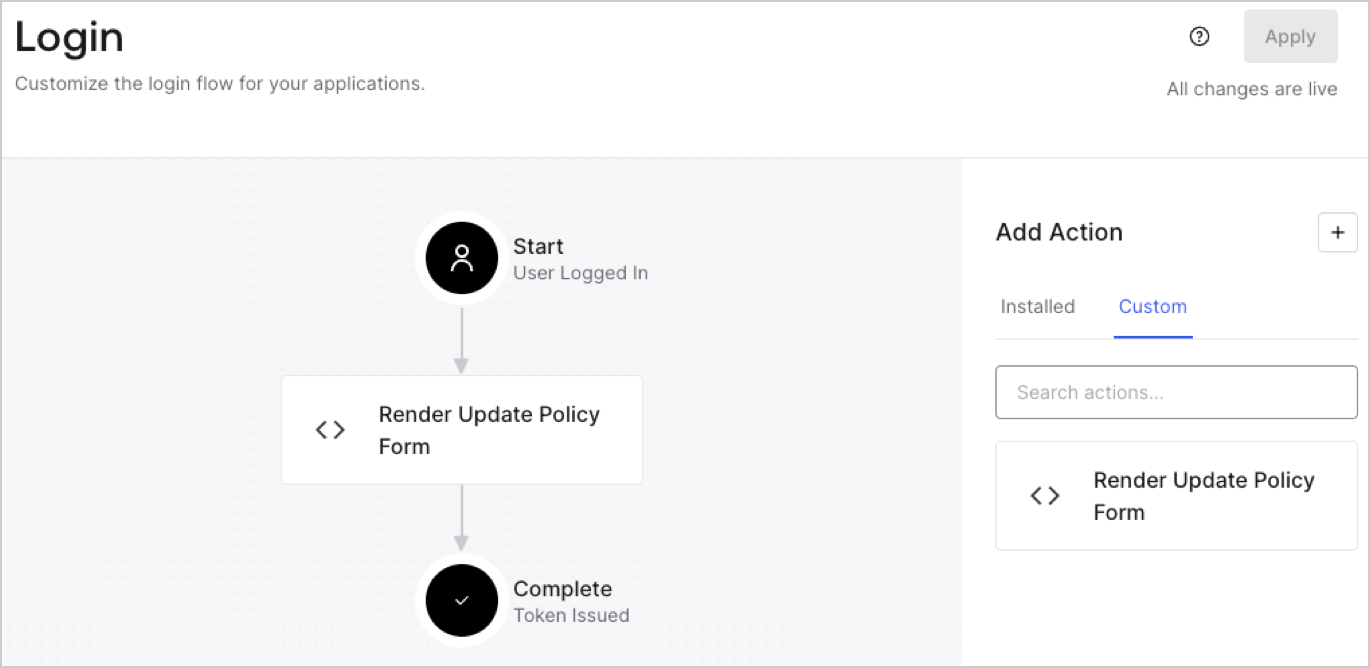
1. Navigate to **Auth0 Dashboard > Actions > Flows > Login.**
2. Select the **+** icon and Select **Build from scratch**:

   * **Name**: Enter `Render Update Policy Form`.
   * **Trigger**: Select `Login / Post Login`.
   * **Runtime**: Select the recommended version.
3. Select **Create**.

To configure the post-login Action:

1. Delete the existing code from the Code editor.
2. Paste the form render code into the Code editor.
3. Edit the code to define the conditional logic that will render the form.

   ```javascript lines theme={null}
   /**
   * @param {Event} event - Details about the user and the context in which they are logging in.
   * @param {PostLoginAPI} api - Interface whose methods can be used to change the behavior of the login.
   */
   exports.onExecutePostLogin = async (event, api) => {
     const FORM_ID = 'REPLACE_WITH_YOUR_FORM_ID';

     if (event.user.app_metadata.privacy_policies !== true) {
       api.prompt.render(FORM_ID);
     }
   }

   exports.onContinuePostLogin = async (event, api) => { }
   ```

   <Callout icon="file-lines" color="#0EA5E9" iconType="regular">
     The example code above will render the form when a user is missing the app metadata `privacy_policies` property.
   </Callout>
4. Select **Deploy.**
5. Drag and Drop the **Render Update Policy Form** Action to the **Login** flow.
   <Frame>
     <img src="https://mintcdn.com/docs-dev-feat-session-delegation/PhKvD16UlZnKecin/docs/images/cdy7uua7fh8z/5TOwDgevZsBqd7yZynUYWU/41ca909dc3007aed4f40ff794a05efa5/postlogin.png?fit=max&auto=format&n=PhKvD16UlZnKecin&q=85&s=14ed318def662865a0f6cf403c36445e" alt="Dashboard > Forms > Use Case > Render update policy form login action" data-og-width="1370" width="1370" data-og-height="668" height="668" data-path="docs/images/cdy7uua7fh8z/5TOwDgevZsBqd7yZynUYWU/41ca909dc3007aed4f40ff794a05efa5/postlogin.png" data-optimize="true" data-opv="3" srcset="https://mintcdn.com/docs-dev-feat-session-delegation/PhKvD16UlZnKecin/docs/images/cdy7uua7fh8z/5TOwDgevZsBqd7yZynUYWU/41ca909dc3007aed4f40ff794a05efa5/postlogin.png?w=280&fit=max&auto=format&n=PhKvD16UlZnKecin&q=85&s=4ca67853316363dedf4ac9979648b67d 280w, https://mintcdn.com/docs-dev-feat-session-delegation/PhKvD16UlZnKecin/docs/images/cdy7uua7fh8z/5TOwDgevZsBqd7yZynUYWU/41ca909dc3007aed4f40ff794a05efa5/postlogin.png?w=560&fit=max&auto=format&n=PhKvD16UlZnKecin&q=85&s=33599712dcff6a78997c9eaa906a39ff 560w, https://mintcdn.com/docs-dev-feat-session-delegation/PhKvD16UlZnKecin/docs/images/cdy7uua7fh8z/5TOwDgevZsBqd7yZynUYWU/41ca909dc3007aed4f40ff794a05efa5/postlogin.png?w=840&fit=max&auto=format&n=PhKvD16UlZnKecin&q=85&s=5e94860d99ff2ed3c4d0e017d4067223 840w, https://mintcdn.com/docs-dev-feat-session-delegation/PhKvD16UlZnKecin/docs/images/cdy7uua7fh8z/5TOwDgevZsBqd7yZynUYWU/41ca909dc3007aed4f40ff794a05efa5/postlogin.png?w=1100&fit=max&auto=format&n=PhKvD16UlZnKecin&q=85&s=c3241f1114fb237ad3baec3ae215d032 1100w, https://mintcdn.com/docs-dev-feat-session-delegation/PhKvD16UlZnKecin/docs/images/cdy7uua7fh8z/5TOwDgevZsBqd7yZynUYWU/41ca909dc3007aed4f40ff794a05efa5/postlogin.png?w=1650&fit=max&auto=format&n=PhKvD16UlZnKecin&q=85&s=2b99d49ed7eb01ca5e2fd46da0aeea9c 1650w, https://mintcdn.com/docs-dev-feat-session-delegation/PhKvD16UlZnKecin/docs/images/cdy7uua7fh8z/5TOwDgevZsBqd7yZynUYWU/41ca909dc3007aed4f40ff794a05efa5/postlogin.png?w=2500&fit=max&auto=format&n=PhKvD16UlZnKecin&q=85&s=9a264047ecb972b92f21d54c8ecc1bb4 2500w" />
   </Frame>
6. Select **Apply.**

### Test implementation

Test the implementation by following these steps:

1. Log in with an existing user whose app`_metadata` attribute `privacy_policies` does not have a value.
2. The post-login Action in the Login flow will render the form and prompt for acceptance.
3. Select **Auth0 Dashboard > User Management > Users,** locate the user and verify that the `app_metadata` attribute `privacy_policies` contains a `true` value and a timestamp.
